Introduction: The best of Both Worlds
For over a decade, marketing teams and developers have been at war. Marketing teams demand the flexibility and ease of use that WordPress provides they want to publish content, edit SEO metadata, and manage media without touching a single line of code. Developers, on the other hand, dread the bloated code, security vulnerabilities, and slow page load speeds that often come with traditional “monolithic” WordPress themes.
In 2026, the solution to this conflict is no longer a compromise; it is an architectural revolution known as Headless WordPress. By decoupling the content management system (CMS) from the frontend display, businesses can finally have their cake and eat it too: the familiar WordPress backend for marketers, powered by a blazing-fast React-based frontend for users.
This architectural shift is more than just a trend; it represents the future of Web App Development. As user expectations for speed and interactivity hit new heights, the traditional model of server-rendered PHP pages is struggling to keep up. By adopting a “Headless” approach, we treat the website not just as a document viewer, but as a modern application, delivering instantaneous transitions and app-like experiences that monolithic sites simply cannot match.
If you are a CTO, Marketing Director, or Founder looking for enterprise WordPress development that doesn’t sacrifice performance, this guide is for you. We will break down why the combination of Headless WordPress with Next.js is the ultimate setup for high-performance marketing sites in 2026.
What is Headless WordPress? (And Why Now?)
To understand the solution, we must first look at the problem. In a Traditional WordPress vs. Headless comparison, the difference lies in how data is delivered to the user.
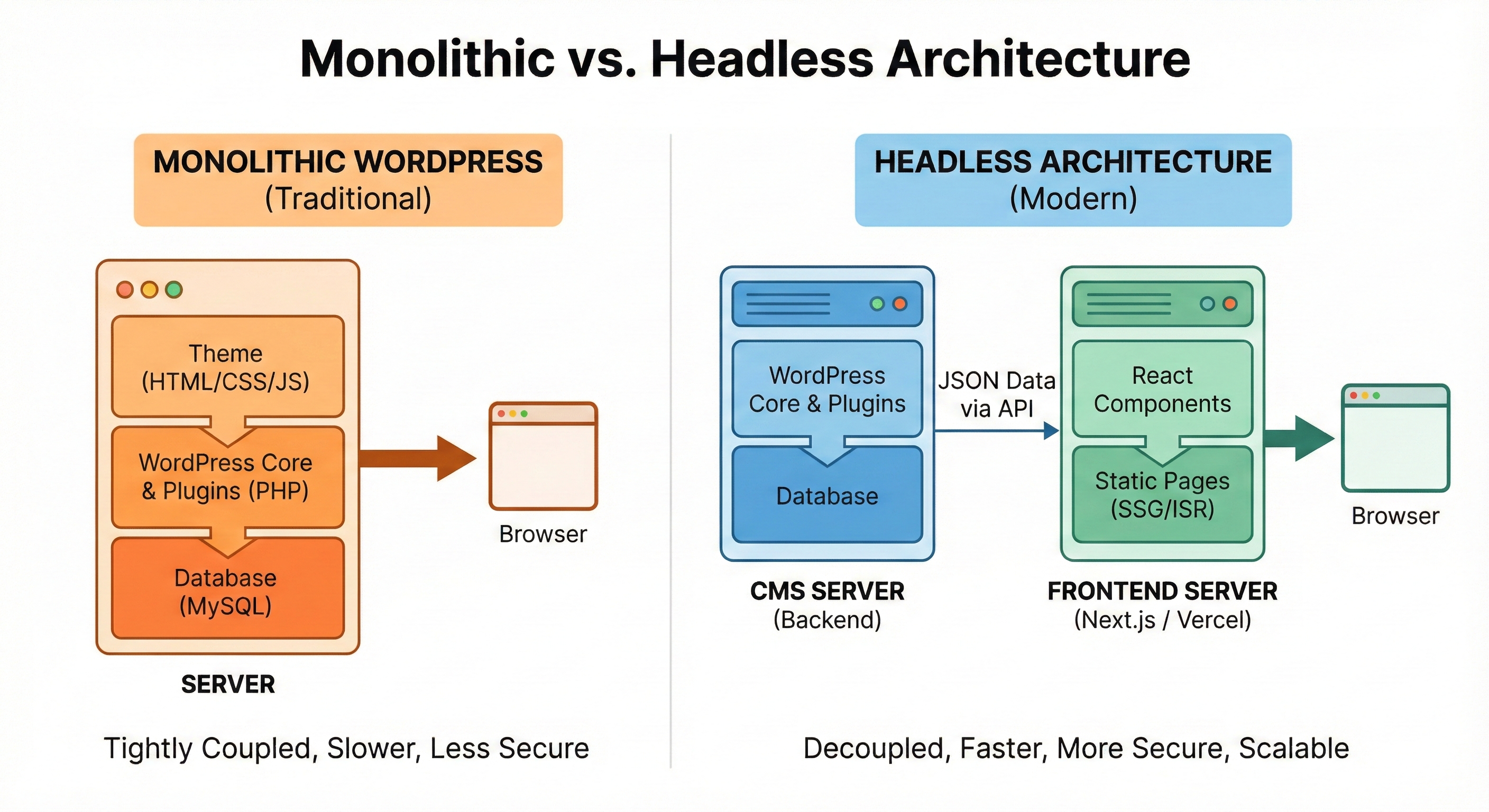
The Monolithic Model (Traditional)
In a standard WordPress setup, the backend (where you edit content) and the frontend (what the user sees) are tightly coupled. When a user visits your site, the server has to build the HTML page from scratch, query the database, process plugins, and then send it to the browser. This is resource-intensive and often leads to slow Time-to-First-Byte (TTFB).
The Decoupled Architecture (Headless)
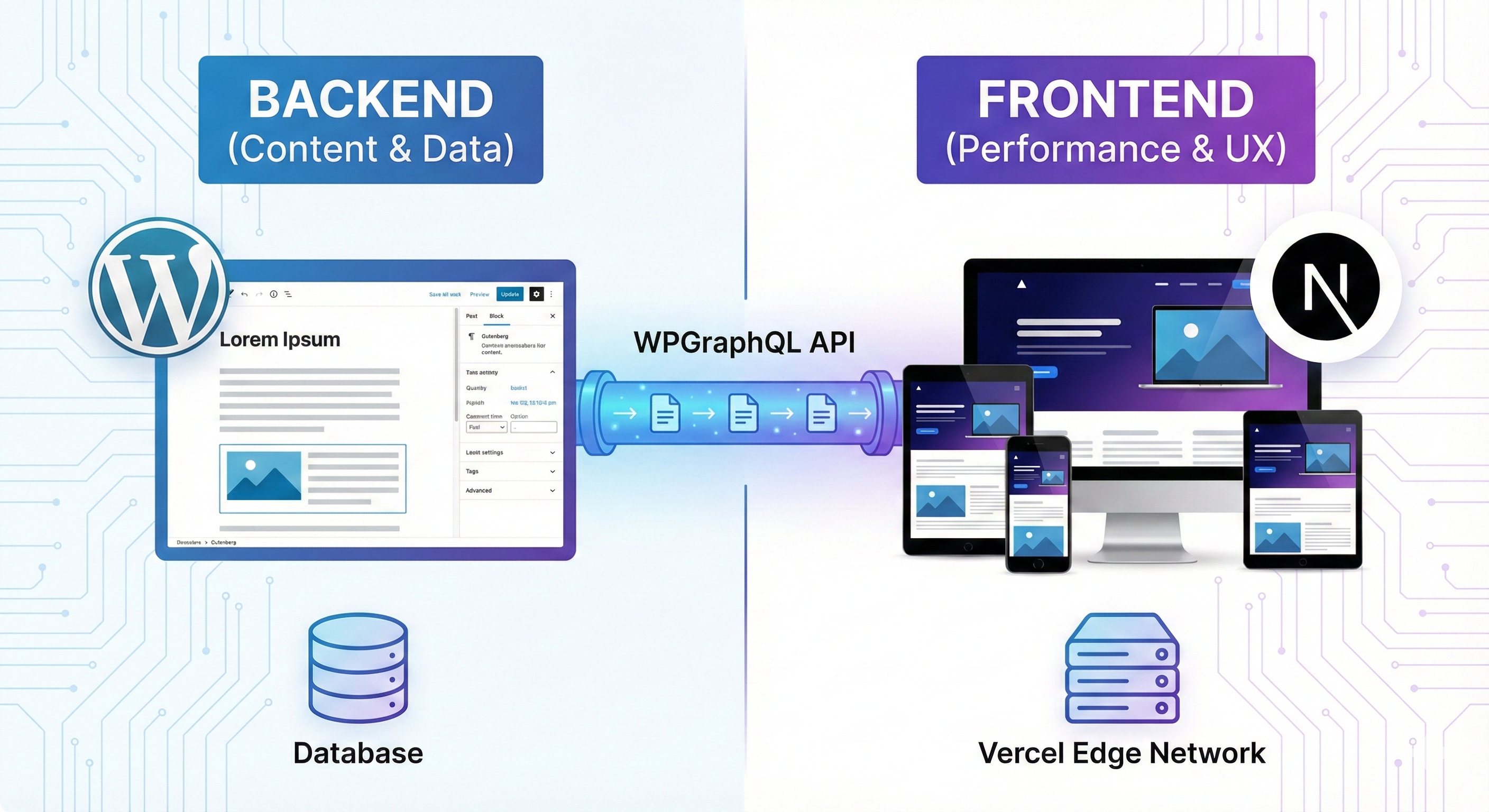
In a Headless WordPress architecture, we cut the head (the frontend theme) off the body (the CMS).
- The Backend: WordPress remains exactly where it is. Your marketing team logs into
/wp-adminand writes posts just like they always have. - The API: We use WPGraphQL to expose this content via a modern API.
- The Frontend: We build a completely separate “head” using Next.js, a powerful React framework. This frontend pulls data from WordPress via the API and displays it to the user.
This separation transforms your site from a static brochure into a dynamic digital product.
The Tech Stack: Next.js, WPGraphQL, and Vercel
Why do we specifically recommend Next.js for marketing websites? While there are other frameworks like Gatsby or Vue, Next.js has established itself as the enterprise standard for Headless WordPress performance.
1. Next.js & Incremental Static Regeneration (ISR)
The magic of Next.js lies in how it renders pages. It utilizes a technique called Static Site Generation (SSG), where pages are built once at deployment and served instantly via a CDN (Content Delivery Network).
But what happens when you edit a typo in a blog post? In older frameworks, you had to rebuild the entire website a process that could take 20 minutes for large sites. Next.js solves this with Incremental Static Regeneration (ISR).
- How it works: When you update a post in WordPress, Next.js rebuilds only that specific page in the background.
- The Result: Your site is always static (fast) but always up-to-date (dynamic).
2. WPGraphQL: The Data Bridge
To get data out of WordPress efficiently, we replace the standard REST API with WPGraphQL.
This allows the frontend to request exactly the data it needs nothing more, nothing less. If we only need the “Title” and “Featured Image,” we don’t fetch the entire author bio and comment history. This efficiency is a massive driver of speed.
3. Vercel: The Hosting Powerhouse
While your WordPress database can live on any standard host (like WP Engine or Kinsta), the Next.js frontend typically lives on Vercel. Vercel’s global Edge Network ensures that your content is cached in data centers closest to your users, whether they are in New York, London, or Tokyo.
Why Enterprise Clients are Switching to Headless
For large organizations, the shift to a decoupled CMS architecture isn’t just about speed—it’s about business continuity and security. Here is why Headless CMS for marketing teams is becoming the standard.
1. Unmatched Security (Secure WordPress Architecture 2026)
WordPress is the most hacked CMS in the world, largely because the frontend exposes the backend to the public. In a monolithic setup, a vulnerability in a frontend plugin can grant attackers access to your database.
In a Headless setup, the WordPress backend is completely hidden. It can be placed behind a firewall or made accessible only via VPN. The public only interacts with the static Next.js frontend. Even if the frontend is attacked, the database remains isolated and secure. This separation creates a secure WordPress architecture that complies with strict enterprise security standards.
2. Omnichannel Publishing
Today, your content doesn’t just live on your website. It needs to appear on mobile apps, smartwatches, digital signage, and third-party platforms.
Because Headless WordPress treats content as “data” rather than “pages,” you can use the same WordPress backend to push content to your Web App, your iOS app, and your internal intranet simultaneously.
3. Scalability Without Crashing
We’ve all seen it: a marketing campaign goes viral, traffic spikes, and the WordPress site crashes. This happens because every visitor forces the server to generate a page.
With Headless WordPress Next.js, the pages are pre-built static assets. A static file cannot “crash” a database. Your site can handle 10 visitors or 10 million visitors with the exact same performance, making it the ideal choice for high-traffic launches.
Traditional WordPress vs. Headless: The Performance Difference
When we talk to clients about WordPress vs Headless performance, we look at Core Web Vitals—the metrics Google uses to rank websites.
| Metric | Traditional WordPress | Headless (Next.js) |
| LCP (Largest Contentful Paint) | 2.5s – 4.0s (Slow) | 0.8s – 1.2s (Instant) |
| CLS (Cumulative Layout Shift) | Moderate (Plugin conflict) | Zero (Strict code control) |
| TTFB (Time to First Byte) | 500ms+ (Server processing) | 50ms (CDN Delivery) |
| Security Risk | High (Exposed backend) | Low (Hidden backend) |
The verdict is clear: for competitive industries where every millisecond counts, React WordPress theme development offers a superior user experience.
Is Headless WordPress Good for SEO?
A common myth is that “JavaScript websites are bad for SEO.” Five years ago, this was true. Today, it is false—provided you use the right tech stack.
Server-Side Rendering (SSR) and SEO
Standard React apps (Single Page Applications) render content in the browser, which can confuse search engine crawlers. However, Next.js uses Server-Side Rendering (SSR) and SSG. This means the server sends a fully formed HTML file to the bot, just like a traditional site.
In fact, Headless WordPress performance often boosts SEO rankings. Google prioritizes the “Page Experience” signal. By achieving perfect Core Web Vitals scores (90-100), Headless sites often outrank their slower, monolithic competitors. Furthermore, you can still use tools like Yoast SEO or RankMath in the WordPress backend; we simply map that data to the Next.js frontend using the API.
ROI: Understanding the Cost
It is important to address the elephant in the room: WordPress vs Headless CMS cost.
- Initial Build: Yes, a Headless build is more expensive upfront (typically 30-50% higher) than a standard theme customization. It requires specialized engineers who know both PHP and React.
- Long-Term ROI: The savings come later.
- Hosting: Hosting static files is significantly cheaper than hosting a heavy database server.
- Maintenance: You no longer have to worry about “plugin updates” breaking your frontend design.
- Conversion Rate: Walmart found that for every 1 second of improvement in load time, conversion increased by 2%. For an e-commerce or lead-gen site, the speed of Headless pays for itself within months.
Implementation Guide: How The Softix Builds Headless
At The Softix, we have refined our process to make the transition to Headless seamless for our clients.
Step 1: Audit & Content Modeling
We analyze your current site. Which plugins are essential? Which can be replaced by custom code? We map out your custom post types (e.g., “Case Studies,” “Services”) to ensure they translate perfectly to the API.
Step 2: The API Layer
We install and configure WPGraphQL. We secure the endpoints so that only your Next.js frontend can request data.
Step 3: Frontend Development
This is where the magic happens. We build a custom design using Next.js. We implement a component-based architecture, meaning we build reusable “blocks” (like Hero Sections, Testimonial Sliders, Call-to-Action Grids) that map to your WordPress Gutenberg blocks.
This allows your marketing team to build complex layouts in the Gutenberg editor that render as high-performance React components on the frontend.
Step 4: Deployment & DevOps
We set up a CI/CD pipeline connected to GitHub. When a developer pushes code, Vercel automatically creates a “Preview URL” for stakeholders to test. Once approved, it merges to production instantly.
FAQ: Common Concerns
1. Will my marketing team lose the ability to Preview posts?
No. This was a problem in the early days of Headless, but today we use “Preview Mode.” This creates a secure bridge that allows WordPress to open a draft version of the post on the Next.js frontend, so marketers can see exactly how it looks before publishing.
2. Can I still use my favorite WordPress plugins?
It depends. Backend plugins (like Yoast SEO, Advanced Custom Fields, Redirection) work perfectly via the API. Frontend plugins (like visual page builders or slider plugins) generally do not work because they rely on jQuery/PHP logic. However, we replace these with superior, custom-coded React alternatives that are faster and more secure.
3. Is Headless overkill for a small blog?
Probably. If you have a simple personal blog with 500 visitors a month, a standard WordPress theme is fine. Headless is designed for High-Performance Marketing Sites, corporate portals, and e-commerce stores where brand perception, security, and scalability are critical.
Conclusion: Future-Proofing Your Digital Presence
The web is moving away from monolithic, server-heavy architectures toward the distributed, API-driven Agentic Web. By adopting Headless WordPress with Next.js, you are not just making your website faster today; you are building a foundation for the next five years of digital innovation.
You get the best content management experience in the world (WordPress) combined with the best frontend performance in the world (Next.js). It is a strategic investment in your brand’s authority and your user’s experience.
Is your current website holding your marketing team back?
Don’t let a slow CMS dictate your growth.
Contact The Softix Today to discuss how we can migrate your legacy site to a high-performance Headless architecture. Let’s build something fast, secure, and scalable.